 |
| New UI for User Leave Settings |
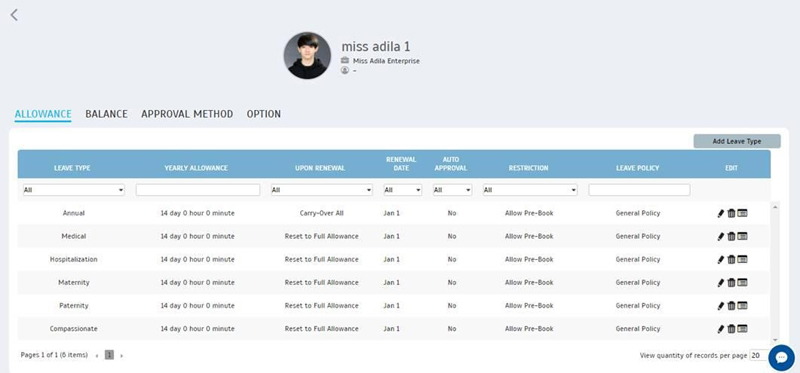
| In TimeTec Leave, you can view each individual user’s leave settings by navigating to User > Manage User > Leave Settings (Edit column). For employees administered under a common leave policy, should you wish to customise leave allowances, balances and other settings for a specific user, you can do so under User Leave Settings page. We’ve recently updated the design as shown in the screenshot below. | |||
 |
| Audit Trail in User Leave Settings |
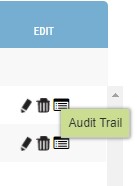
| As mentioned above, you can adjust user’s leave based on their specific employment conditions at User Leave Settings. To improve system’s record and accountability, we’ve incorporated a new audit trail function that tracks all changes made to Allowance and Balance. Click on the right-most Audit Trail icon to display the audit trail of each leave type. | |||
 |
|||
| a. | Conditions as below. | ||
| i. Leave calendar renewal year | |||
| ii. Leave balance accrual | |||
| iii. Service accrual (Increment of allowance) | |||
| iv. Service accrual (Changing of policy) | |||
| v. Manually change leave policy | |||
| vi. Leave application (approved application | |||
| vii. Leave application (cancelled application) | |||
| viii. Manually edit | |||
| ix. Import User Leave Balance | |||
| x. Assign Policy to new user | |||
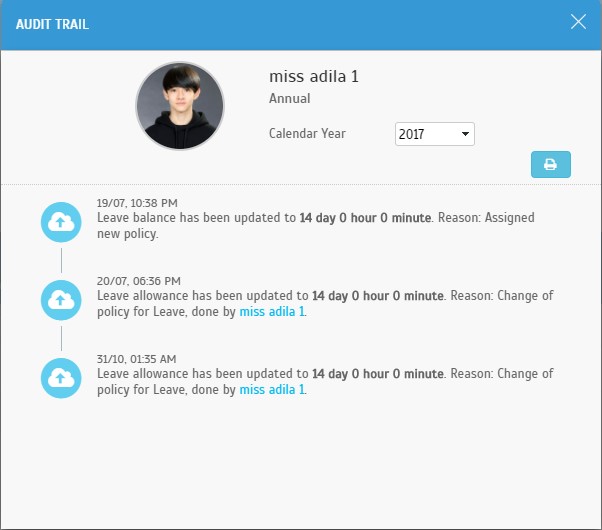
| b. | Audit Trail of Allowance | ||
 |
|||
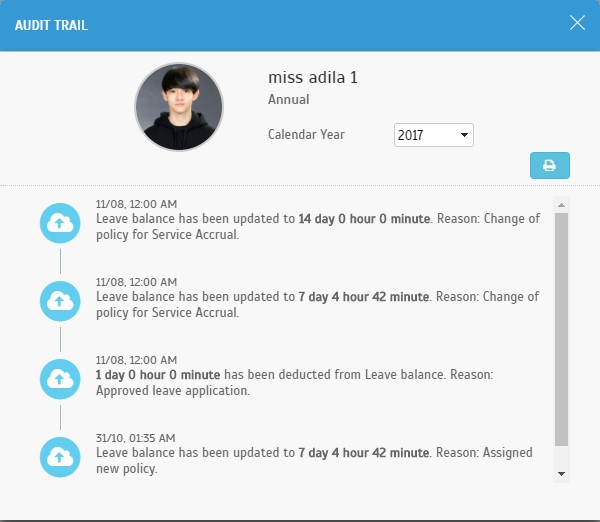
| c. | Audit Trail of Balance | ||
 |
|||
| Other Updates |
| 1. | Leave Overview performance enhancement. |
| 2. | Support Menu - Added link for Tips > FAQ |
| 3. | Footer - Updated link for New Features |
| Previous Issue: October 2017 • September 2017 |
| Note: Some of the screenshots viewed here might be different from the ones in the current system due to our continous effort to improve TimeTec from time to time. |